TDM Analyzer v2.3.0 — Live Audio Streaming + Playback GUI
Hey everyone — wanted to share a major update to my TDM Analyzer. The big addition: you can now hear your decoded TDM audio in real time while Logic 2 is capturing.
What’s new
Live Audio Streaming (HLA)
A new High Level Analyzer streams selected TDM slots as PCM audio over TCP during capture. Pick the slots you care about, and decoded audio flows out in real time — 16 or 32-bit, any sample rate your TDM bus runs at.
Companion Playback Tool with GUI
A new tdm-audio-bridge tool connects to the stream and plays it through your speakers. It comes with a simple GUI — no terminal needed. On
Windows it installs as a double-clickable .exe (no console window).
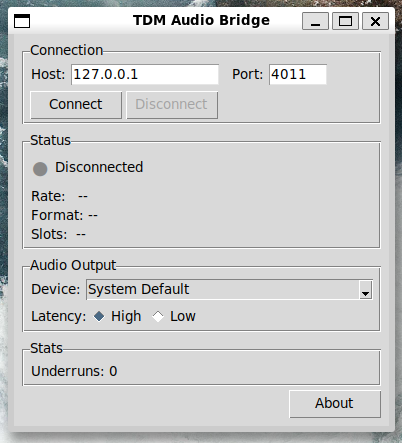
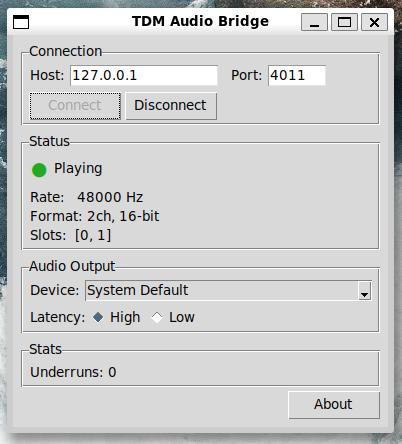
You can also route audio to a virtual sound card (VB-CABLE on Windows, BlackHole on macOS, PipeWire null-sink on Linux) to record in any DAW while capturing.
Real-Time WAV Export (HLA)
A second HLA writes selected slots directly to a WAV file as frames arrive — no need to wait for capture to finish and do a post-export
step. Supports slot selection with range syntax (0,2-4,7), custom channel ordering, and RF64 for recordings over 4 GiB.
Standalone Test Harness
For anyone developing against TDM or wanting to verify their setup without hardware, tdm-test-harness can generate test signals (sine, ramp, silence, or WAV files) and stream them through the same pipeline. It includes automated quality analysis using sox — glitch detection, dropout detection, frequency verification. There’s a full 11-test quality sweep that covers sample rates from 24 kHz to 96 kHz, mono through 4-channel, 16 and 32-bit depth, loop boundaries, reconnection resilience, and buffer pressure.
Quick start
Install the companion playback tool
pip install tools/tdm-audio-bridge/
Launch the GUI
tdm-audio-bridge gui
Or use the CLI
tdm-audio-bridge listen
In Logic 2:
Extensions > Load Existing Extension > select the hla-audio-stream/ folder.
Add “TDM Audio Stream” after the TDM LLA in your analyzer chain, configure your slots, and start capturing.
Try it without hardware
pip install tools/tdm-test-harness/
Terminal 1: serve a 440 Hz stereo test signal
tdm-test-harness serve --signal sine:440 --channels 2
Terminal 2: launch the GUI and click Connect
tdm-audio-bridge gui
Platform support
Works on Windows, macOS (Intel and Apple Silicon), and Linux. Pre-built binaries for all platforms are in the Release v2.3.0 · bitswype/saleae_tdm_analyer · GitHub. The release zip includes the C++ analyzer, both HLAs, and the Python tools.
Links
- GitHub: GitHub - bitswype/saleae_tdm_analyer: TDM analyzer for Saleae logic 2 · GitHub
- Release: Release v2.3.0 · bitswype/saleae_tdm_analyer · GitHub
- Full audio stream docs: see
hla-audio-stream/README.mdin the repo
The existing LLA features (decode, error detection, CSV/WAV export) are all still there and unchanged. This release just adds the streaming
and real-time export layers on top.
Feedback and bug reports welcome — open an issue on GitHub.